WhatsApp Privacy Extension
Take control of your messaging privacy instantly.
You know the feeling. You're sitting in a crowded lecture hall, a busy cafe, or an office. You open WhatsApp Web, and suddenly you feel eyes on your screen. We built this tool so you can message in public without the paranoia. Secure your screen from shoulder-surfers and take back your privacy.
Ready to enhance your privacy? Click Below To Get It!

How to Get Started
1. Install & Pin
Add it to Chrome, click the puzzle piece icon 🧩, and pin the extension to your toolbar for instant access.
2. Adjust Settings
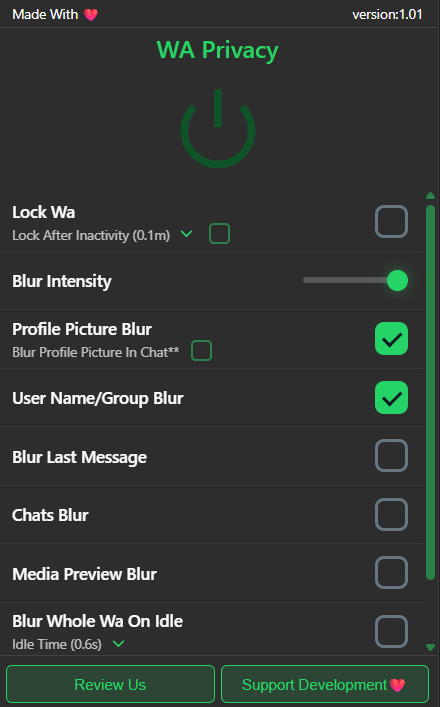
Click our green icon to toggle the blur intensity, hide profile pictures, and set your lock screen timer.
3. Hover to Read
Your screen is now secure! Simply hover your mouse cursor over any blurred text or image to instantly reveal it.
Extension Features
- 100% Local: Lightweight, secure, and runs locally on your browser without sending your data anywhere.
- Quick Toggle: Seamlessly turn privacy mode on or off instantly with a single click.
- Lock WhatsApp: Add an extra PIN or password to secure your entire WhatsApp Web session from unauthorized access.
- Hover to Unblur: Instantly reveal blurred content by simply hovering your mouse, keeping the rest blurred.
- Hide Profile Pictures And Groups: Blur or hide profile pictures and contact names for shoulder-surfing protection.